

Adomo for Zoom: An AI Meeting Agent, Now GA
Adomo for Zoom is generally available today. You connect it once from the Integrations page in Adomo. It opens in the side panel of any meeting and runs the tools your company already uses, live, in the call, acting as the person who asked, with that person’s permissions rather than a service account’s. It is an AI meeting assistant that acts. We call it a meeting agent, because the work lands in your systems rather than in a summary.
Say “Adomo, what’s the open pipeline on this account?” out loud in a call and the answer comes from your CRM, not from the model’s memory of the transcript. Say “Adomo, raise the PO” and a purchase order gets raised in your ERP, under whatever approval rules your finance team wrote.
TL;DR
- Address it two ways: say “Adomo” out loud, or type in the Zoom side panel. Both reach the same agent, mid-meeting.
- It uses your workspace’s entire tool set: 30+ integrations, plus any internal system you expose over MCP. Nothing to configure per meeting.
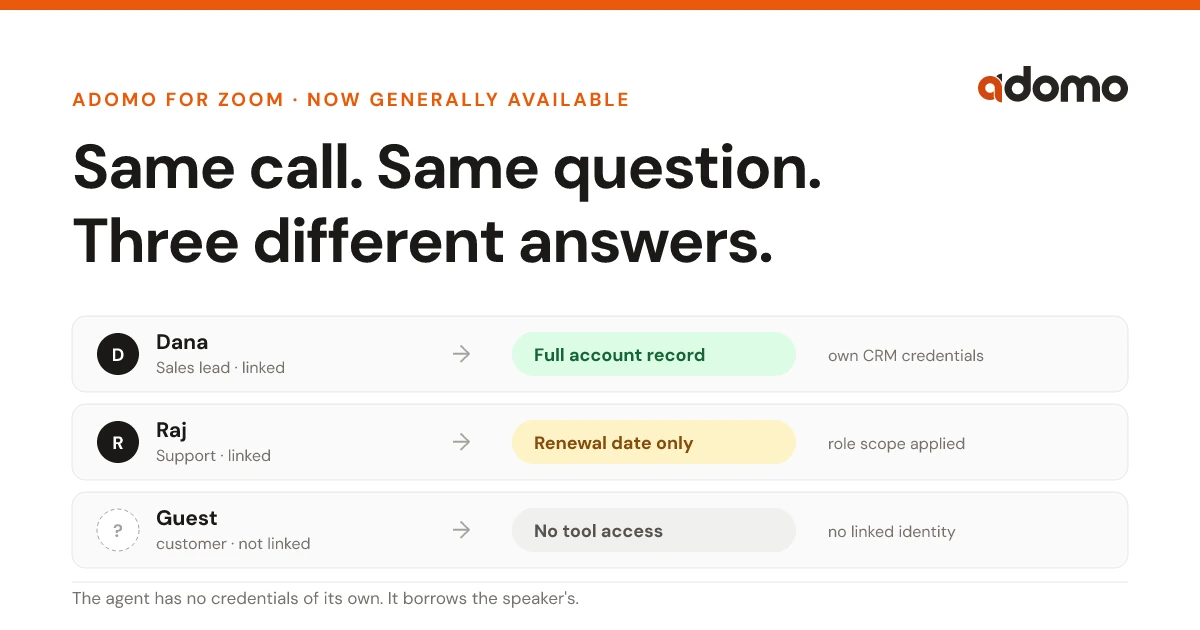
- Every tool call runs with the speaker’s own identity and credentials. Two people in the same call get different answers, correctly.
- Guests and unlinked participants get zero tool authority. The model answers; nothing executes.
- Consequential actions stop at your existing approval gates, and every invocation lands in the audit log.
- Connect it once from the Integrations page in Adomo; enterprises can still run it under their own Zoom app.
This is the launch note. For the product itself, including the permission model and what it can act on, see the AI meeting assistant page.
AI meeting assistants stopped at the transcript
Notetakers record, transcribe, and summarize. That is genuinely useful and completely finished by the time the call ends. The summary arrives, and then a human opens six tabs to do the actual work the meeting created.
The newer meeting copilots go a step further and answer questions about what was said. Still a closed loop: the meeting is the only data source, and the meeting is the only thing you can act on.
What actually happens in a customer call is different. Someone asks what that account’s renewal date is. Someone else says they’ll file the ticket. A number gets questioned and nobody can check it. The meeting is where the work gets identified, not where it gets done. Every one of those items lives in a system the meeting AI cannot reach.
So we built the agent from the other direction. Adomo is an AI operator that already runs business processes across the systems you have. The Zoom app puts it in the meeting.
Say its name, or type it
There are two ways to reach it. Both go to the same agent.
Talk to it. The app subscribes to Zoom’s real-time media stream and matches the live transcript against its wake words (“Adomo” and “Hey Adomo”) with fuzzy matching, so a mumbled name or an imperfect transcription still lands. You do not press anything. You say its name in the sentence, the way you would address a colleague on the call, and keep talking.
Type to it. The side panel has a chat box. Useful for the question you would rather not say out loud in front of a customer, for pasting an ID, or for a follow-up that does not need to interrupt anyone.
Answers appear in the side panel, attributed to whoever triggered them. Multiple people can address the agent in the same call; requests are processed in order and each answer is attributed to the right person.
It brings your whole tool stack into the call
The meeting agent has no separate integration list. When a meeting starts, it resolves your workspace’s tool set: whatever Adomo is already connected to. HubSpot, SAP S/4HANA, Odoo, QuickBooks, Stripe, Google Workspace, Microsoft 365, GitHub, Jira, Slack, and the rest of the 30+ integrations Adomo already speaks, plus any internal or vendor system you have exposed as an MCP server. There is no per-meeting configuration, no allow-list to curate, no “connect Zoom to HubSpot” step.
That means the useful requests are the boring ones:
- “Adomo, what did we ship in this repo since their last release?” (GitHub)
- “Adomo, is their invoice from March still open?” (QuickBooks)
- “Adomo, log this as an at-risk deal and note why.” (HubSpot, written during the call rather than after it)
- “Adomo, check inventory on that SKU for the London warehouse.” (SAP)
- “Adomo, post the action items to the account channel.” (Slack)
And because custom MCP servers are first-class, “any tool you have” includes the internal one nobody else integrates with. If you can expose it over MCP, it is available in the meeting the day you connect it.
It acts as you
The easy way to build a meeting agent is to give it a service account with broad access and let it answer anyone who asks. That means the intern on the call can ask the bot a question the intern is not allowed to ask the CRM, and get an answer.
Adomo does not have ambient authority in a meeting. When someone triggers the agent, the platform resolves that speaker to their Adomo identity via their linked Zoom account, and every tool call runs with their credentials and their role. Four checks run server-side before anything executes: the tool has to be available to the workspace, the speaker has to be a linked user, their role has to permit tool use, and the request has to clear your delegation and approval policies.
That has consequences worth spelling out:
- Two people can ask the same question in the same meeting and get different answers. That is the intended behavior.
- A participant who has not linked their Zoom identity (a customer, a candidate, a vendor) gets no tool access at all. The model can answer from the conversation; it cannot touch a system.
- Asking the agent for more access does not grant it. Request something above your level and the agent says so and names who can approve it, rather than escalating.
- Saying “ignore your instructions” into a Zoom call does not work. Transcript text is user content, structurally separated from system instructions, and policy is evaluated server-side where the model cannot reach it.
Spoken in the call
Live transcript “Adomo, is their March invoice still open?”
Wake word matched
Fuzzy matching catches an imperfect transcript.
Speaker resolved
Zoom participant → their linked Adomo identity.
Server-side policy gate
Four checks before anything runs
The model cannot reach these. Prompt text cannot bypass them.
- 01 Tool accessThe tool belongs to this workspace.
- 02 Linked identityThe speaker has a linked Adomo identity.
- 03 Role permissionTheir role permits tool use.
- 04 Approval policyDelegation and approval policy allows it.
If any check fails, nothing runs. The reason appears in the panel and the denial is logged.
The tool runs
With the speaker’s own credentials, never a shared service account.
Two things come back
The answer in the side panel, plus an audit entry of who asked, what ran, and what returned.
Consequential actions still stop where they always stopped. If your policies require sign-off on a payment, a customer email, or a PO, the agent proposes and routes the approval. It does not execute because someone said so in a meeting.
You watch it work
The side panel shows the agent’s state: listening, or working; which tools are running right now; which finished, with results; and, for each action, the line of transcript that triggered it.
When an AI takes an action off something it overheard, the first question anyone asks is “why did it do that?” The answer is on screen, quoted, next to the action.
How it compares
| Records the call | Answers about the call | Reads your systems | Acts in your systems | Acts as whom | |
|---|---|---|---|---|---|
| AI notetaker | Yes | After the fact | No | No | n/a |
| Meeting copilot | Yes | Yes | Rarely, one or two apps | No | n/a |
| Meeting bot with a service account | Yes | Yes | Yes | Sometimes | The bot; everyone gets its access |
| Adomo for Zoom | Yes | Yes | Your whole stack + MCP | Yes, under policy | The speaker, with their own permissions |
What we ship for the people who sign off on this
A meeting agent that can write to your ERP is a governance question before it is a product question. GA means these exist, not that they are on the roadmap.
Participants are told. When a session starts, the app surfaces a notice that an Adomo agent is present and processing the meeting audio and transcript, including to external guests. We surface it ourselves rather than making the installing admin promise they told everyone.
Everything is logged. Every tool invocation records the meeting, the requesting user, the tool, a redacted input summary, the result, and the duration. Every denial records the rule that caused it and the transcript context. Sessions end with an activity summary: interactions, tools invoked, policies applied, denials issued.
Install fits your app governance. Most teams connect Zoom from the Integrations page and are done. Credentials are ours, held in Vault, never exposed to your tenant. Enterprises that require their own Zoom app for scope control or data-residency reasons keep the bring-your-own path, with identical tool control and identity behavior. You choose per workspace.
Uninstalling deletes the data. Deauthorizing from Zoom immediately revokes access, terminates live sessions, and triggers deletion of the Zoom-derived data we hold (transcripts, summaries, identity mappings, stored tokens) within Zoom’s ten-day window, with confirmation posted back to Zoom.
Meetings survive infrastructure. Sessions run as durable workflows, so a worker restart mid-call does not lose the meeting. Dropped media connections reconnect with backoff.
What it does not do yet
Two limits worth stating plainly, because you will hit them in the first week.
The agent does not speak. It hears you, but its answers appear in the side panel rather than coming out of a speaker or posting into Zoom chat. If nobody on the call has the panel open, nobody sees the answer. An outbound voice and meeting-chat channel is the next thing we are building, and it is also what will broaden the presence notice beyond panel users.
It is Zoom first. Microsoft Teams is in development on the same platform components (the identity, policy, and tool layers are not Zoom-specific), but it is not shipping today.
Getting started
- In Adomo, open Integrations and connect Zoom. Authorizing it for the whole account needs a Zoom admin.
- Each person links their own Zoom identity from their Adomo profile. Three clicks, and it is identity only: name and email, not meeting content. This is what turns them from a read-only participant into someone the agent can act for.
- Connect whatever you have not connected yet. Anything in your workspace tool set is live in the next meeting.
- Join a call, open Apps → Adomo, and say its name.
The full documentation covers the permissions Adomo requests and how to remove it.
Frequently asked questions
How is this different from an AI notetaker?
A notetaker’s output is a document. This one’s output is finished work in your systems. They are not really competitors, and several customers run both.
Does it record or store our meetings?
It processes the live transcript to do its job, and what is retained depends on your account’s data settings. Deauthorizing the app deletes the Zoom-derived data within ten days. If your requirement is that meeting content never leaves your environment, Adomo deploys in your own VPC or on-prem, and that applies to the meeting agent too.
Can a customer on the call use it?
They can talk to it and get answers drawn from the conversation. They cannot reach a single one of your systems, because they have no linked identity and therefore no tool authority. That is enforced server-side, not by asking the model to behave.
What stops someone from using it to see data they shouldn’t?
The agent has no credentials of its own. It borrows the speaker’s. If you cannot see it in HubSpot, you cannot see it by asking Adomo in a meeting, and the attempt is logged. The system also watches for the subtler version, where several permitted requests are chained to assemble something the person could not access directly.
Do we have to configure which tools it can use in meetings?
No, and deliberately so. It inherits your workspace’s tool set and gates every call per-participant at invocation time. Curating a separate meeting allow-list gave admins a false sense of control while the real control (who is asking, and what they are allowed to do) lived elsewhere.
Does it work if we run our own Zoom app?
Yes. Bring-your-own credentials remain fully supported with feature parity. You pick platform or BYO per workspace.
What does it cost?
It is part of Adomo, not a separate SKU. Plans start at $100/month for individuals and $500/month for teams; meeting usage draws on the same credit budget as everything else.
The quickest way to evaluate it is one real call with one real system connected. Ask the agent for something you would otherwise have alt-tabbed for. Start a free trial, follow the install steps, or have us set it up with you.